
On this page
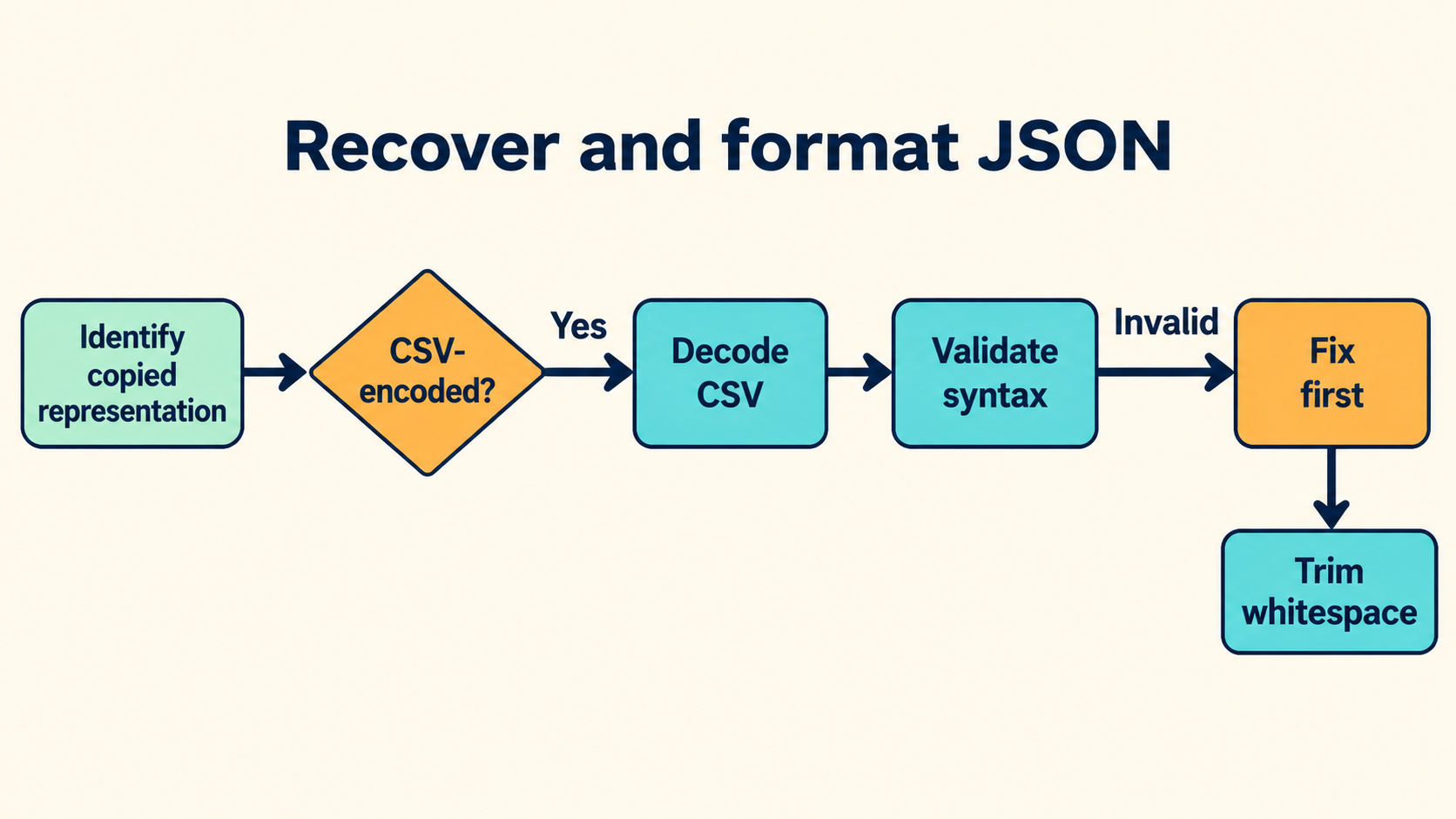
Name the Representation Before Touching It
JSON pasted out of a spreadsheet arrives in one of several states, and each state needs a different first move. The single most useful question is about provenance: what did you copy from, and did the copying application decode anything on the way out?
| What you may have copied | What to establish | First step |
|---|---|---|
| A serialized CSV field | Whether CSV wrapping and doubled quotes remain | Decode the field with matching CSV settings |
| A full CSV record | Which row and column hold the document | Parse the record, select the field |
| An already-decoded cell value | Whether the text is the cell’s value as the app saw it | Validate directly as JSON |
| A JSON string containing JSON | Whether the outer string is intentional | Confirm the intended decoding before extracting |
The cost of guessing wrong is concrete. Applying CSV decoding to text that was already decoded wraps the value in a fresh error; validating CSV-wrapped text as JSON fails on the first quote. One clarifying question — “did you copy from the raw export or from the cell?” — replaces two failed recovery attempts.
Keep an untouched copy of the input for the whole session. Recovery is destructive by nature, and the readable result at the end must be distinguishable from a preserved result: attractive indentation proves nothing about whether escapes, duplicate keys or long numbers survived.
Extract the Field With a CSV Parser, Not a Regex
CSV quoting has corner cases that defeat pattern matching in proportion to how confident you feel about it. A field containing a comma, a quote and a newline is legal; the doubled quote is the escape mechanism; different exports disagree about line endings and quoting style. A parser configured for the actual export handles all of it; a regex handles the sample you tested.
// with a CSV library configured to match the export:
import { parse } from 'csv-parse/sync';
const records = parse(rawText, { columns: false });
const cell = records[2][4]; // the row/column holding the JSON
The settings worth making explicit, because exports vary on every one of them:
- Delimiter — comma, semicolon and tab all occur in the wild
- Quote character and whether doubled quotes mean an escaped quote
- Line endings —
\r\ninside quoted fields is legal CSV - Header row presence, which shifts every row index by one
One subtlety matters more than the rest for JSON recovery: a quoted CSV field containing a physical newline is still one field. Editors that rewrap pasted text can split it, and the JSON then fails at a point unrelated to the actual content. If extraction succeeds but validation reports a syntax error at a line boundary, suspect the copy operation rather than the document.
Why Spreadsheets Make This Harder Than It Looks
The spreadsheet deserves its own section because it introduces transformations no other layer does. Cell display and cell value are different strings: a column formatted as text truncates at the display width, a column formatted as number re-renders values, and a locale that prints decimals with a comma will happily hand you a document whose numbers no longer parse. None of those edits exist in the export; all of them exist in the copy.
cell value:  {"n": 3.141592653589793}
displayed:   3.14159       ← what a copy from the cell surface takes
Copying from the cell surface takes what the display shows. Copying from the raw export takes what the file contains. This is why the provenance question in the opening table decides the whole recovery: same document, same spreadsheet, two different bytes depending on which surface the copy touched.
The second spreadsheet-specific hazard is silent type coercion on import. A CSV whose JSON field contains only digits can be reinterpreted as a numeric column on the next import round, stripping quotes and — for values above the safe-integer range — changing digits. Recovering from a round trip through a spreadsheet therefore means validating not just syntax but value types: quote placement, number spellings, and any ID whose last digit looks suspicious.
The defense is unglamorous and complete: never treat a spreadsheet as a JSON editor. Store documents in files, use the spreadsheet for tabular data, and when a JSON payload must travel through one, keep the raw export alongside the session so the display layer never becomes the only copy.
One Example Through Both Layers
A worked example pins the whole pipeline down. The intended document is {"label":"a,b"} — chosen because its value contains the delimiter, which is exactly the character that makes naive copy-and-paste recovery fail.
Stage one: the CSV layer. Serialized under the common quoting convention, the field travels as:
"{"","label"","","a,b"}"
The outer quotes wrap the field; every quote inside is doubled. A parser configured with that convention extracts the intended text:
parse('"{"","label"","","a,b"}"')[0][0];
// '{"label":"a,b"}' — the JSON layer begins here
Stage two: the JSON layer. Validate the extracted text, then format a copy:
const doc = JSON.parse(cell);
JSON.stringify(doc, null, 2);
// {
//   "label": "a,b"
// }
Two layers, two decodings, each applied once, in order. Every recovery failure this article has seen reduces to a violation of one of those constraints: a second CSV pass, a first JSON pass on wrapped text, or an editing step in between that changed the bytes.
Format Without Rewriting Escapes
Formatting changes whitespace outside strings and nothing else. That boundary is what makes formatting safe to apply to recovered documents, and it is the boundary a “helpful” cleanup step breaks first. A formatter that re-quotes keys, normalizes unicode escapes or “fixes” number spellings is rewriting data under a cosmetic name.
const recovered = '{"n":1e3,"s":"line\\u0020break"}';
const pretty = JSON.stringify(JSON.parse(recovered), null, 2);
// value-level view: n is 1000, s has a space
// token-level truth: 1e3 and \u0020 are what the producer wrote
The distinction matters when the recovered document returns to a system that compares tokens: an API expecting the exact number spelling, or a signature check over raw bytes, sees a rewrite as corruption. The practical rule is the one the inspector on this site applies: format the view, keep the source. The source pane shows the tokens as recovered; the formatted pane shows structure; neither changes the other.
Find the Failure in the Right Layer
Recovery failures cluster into three signatures, and attributing them correctly is most of the diagnosis. The signatures are worth memorizing because each one names its own fix, and applying the wrong layer’s fix to a failure is how a recoverable document gets permanently mangled.
- Fails on the first character. The text is still CSV-wrapped. Back up to stage one; the JSON layer has not started yet.
- Fails inside what looks like a valid string. A quote or backslash was mangled — usually a doubled-quote sequence that survived only partially, or a copy that rewrapped a quoted newline.
- Validates but values look wrong. Number tokens changed spelling, a duplicate key collapsed to its last value, or unicode escapes were rewritten. The JSON layer passed; a rewrite layer did damage after it.
// signature two, isolated:
const s = '{"path":"C:\\\\Users\\\\ada"}';
JSON.parse(s).path; // 'C:\\Users\\ada' — count the backslashes in the raw text, in pairs
When a failure does not match any signature, the untouched copy earns its keep: diff the current text against it and the editing step that introduced the damage is visible as a change between two versions of the same recovery.
Duplicate Keys, Numbers and Recovery Limits
Three properties of JSON resist recovery, and each deserves an explicit decision rather than a default. A fourth practice — writing the recovery steps down as they are performed — converts the whole exercise into a repeatable procedure the next incident can follow directly.
Duplicate keys. A document with the same key twice is valid JSON. Parsers disagree about what survives: last-value-wins is common, some runtimes reject, and a formatter usually prints whatever its parse produced. Recovery that collapses duplicates silently rewrites the producer’s document. The inspector on this site rejects duplicate keys rather than choosing for you — an explicit outcome beats an implicit one during recovery, when “which value did the producer mean” is exactly the question under investigation.
{"retry": true, "retry": false}
Number tokens. 1e3, 1000 and 1000.0 name the same decimal value in different spellings. Value-level comparison calls them equal; token-level consumers do not. A recovery report that states the tokens verbatim — including any number above the safe-integer range, where a lossy parser would already have changed the digits — lets the next reader verify rather than trust.
Information already lost. Some damage predates the copy: a cell truncated by a spreadsheet’s character limit, an export that re-encoded text, a key collapsed by an earlier tool. No recovery step restores what the input never contained. The report should say so explicitly — “the source text ends mid-string; the original export is required” — because that sentence redirects the investigation to the system that still holds the truth.
The full pipeline runs locally in the browser: paste, identify the layer, extract, validate, format the view. Nothing uploads, nothing executes, and the untouched copy stays in your editor the whole time. Recovery done this way is not glamorous; it is a chain of small, verifiable steps, each of which names its layer — which is what makes the final “restored” label honest.
One last framing helps set expectations for the whole exercise. Recovery is forensic work: the goal is not to make the text look right but to establish, step by verifiable step, what the producer sent and where every change since then entered. The report that documents those steps is often more valuable than the recovered document itself, because it is the artifact the next incident inherits — a procedure, with layers named and limits stated, that starts where this one ended.