
On this page
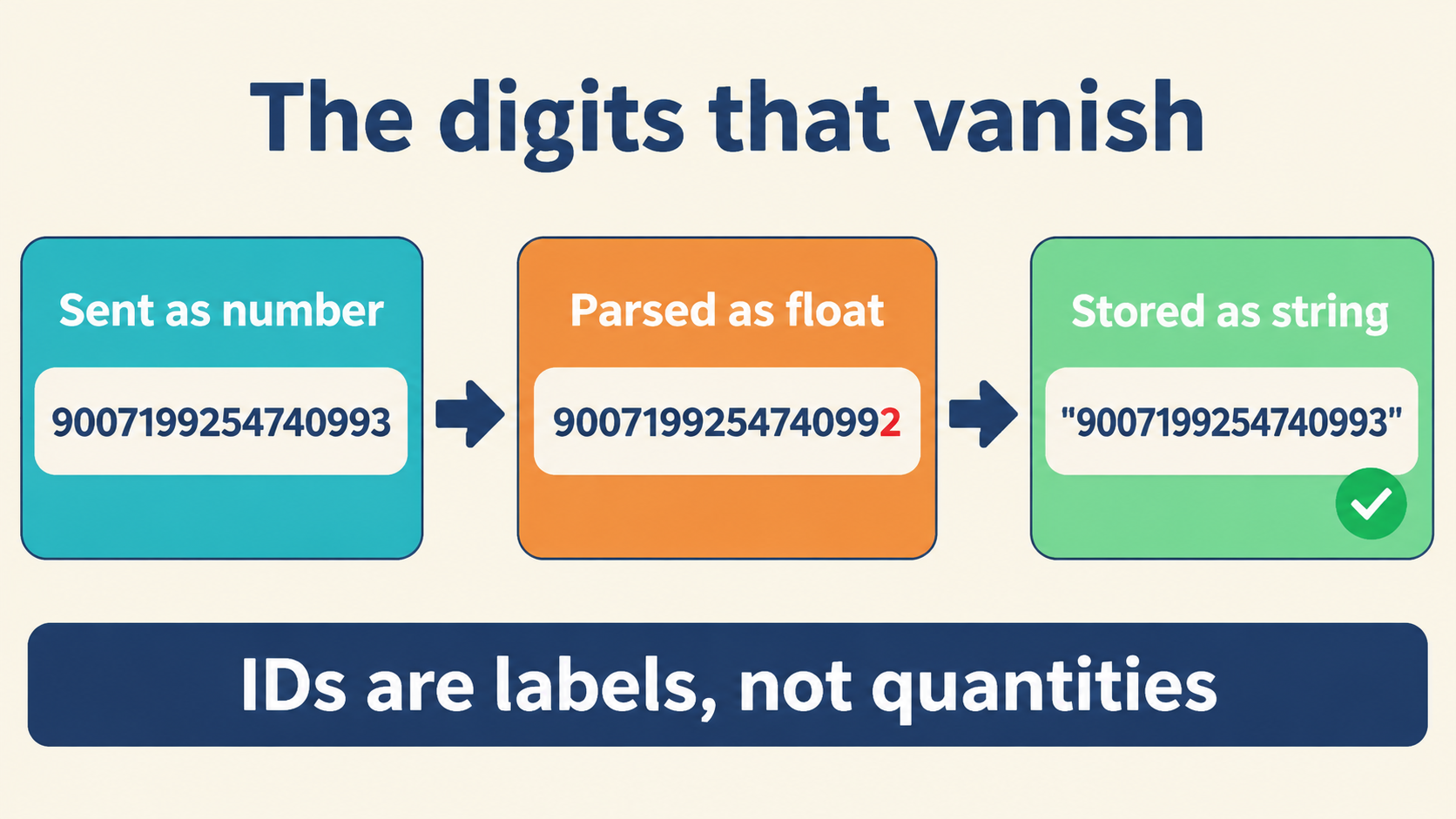
The Ceiling Above Every JSON Number
JSON’s number syntax permits any sequence of digits. The runtimes that consume it do not. JavaScript stores every number — integer or decimal — as a 64-bit IEEE 754 floating-point value, and that format dedicates 53 bits to the significand. The consequence is a hard ceiling: integers up to 2^53 − 1 are represented exactly; anything beyond is rounded to the nearest representable double.
Rounding means collisions. The integers 12345678901234567890 and 12345678901234567000 are distinct on paper, but in JavaScript they compare equal, because both map to the same double. Nothing about JSON itself caused that — JSON carried the digits faithfully. The loss happened in the numeric type the runtime chose for them:
12345678901234567890 === 12345678901234567000; // true — both collapse to one double
Number.MAX_SAFE_INTEGER; // 9007199254740991 — the exact-representation ceiling
The same ceiling applies to decimals. Even inside the safe integer range, a decimal with more than about 15–16 significant digits can lose precision. The boundary is not visible in the data — a corrupted value looks like an ordinary number — which is precisely what makes this class of bug dangerous. It ships silently and surfaces only when someone compares values, reconciles totals, or performs arithmetic downstream.
The failure mode has a signature worth learning to recognize. It almost never appears as an error message. Instead it appears as a reconciliation delta that won’t close, an ID that “sometimes” doesn’t match, a total that differs by a few units between two systems reading the same payload. Teams waste hours blaming synchronization or caching before anyone thinks to compare the raw numeric text on the wire with the value in the debugger — because nobody suspects that a number can change without anything failing:
// the silent-corruption signature: no exception, just wrong digits
const a = JSON.parse('{"order_id":7000000000000000123}').order_id;
a;                                  // 7000000000000000000 — quietly rounded
a === 7000000000000000123;          // true (!) — both collapse to the same double
String(a);                          // '7000000000000000000' — the digits that will be re-sent
Any language that parses JSON into native doubles shares the limitation. If your architecture includes JavaScript on either side of the exchange, assume the ceiling exists whether or not your server language offers bigger types.
Where the Digits Disappear: Write, Read, Round Trip
Precision can be lost at two distinct moments, and it helps to name them separately.
Serialization. When JSON.stringify() writes an object, it converts each in-memory number to decimal text. If the number already exceeded the safe range — because it came from a calculation or a parsed payload — the value in memory is already the rounded approximation. The wire text is then that approximation, and the original digits are unrecoverable.
Parsing. The more visible loss. JSON.parse() converts each numeric token directly into a double. For 12345678901234567890, the parser produces a value that differs from the written digits — and this happens before any of your code runs. Even a reviver function receives the already-rounded double; the original token’s digits are discarded the instant the token is interpreted:
const parsed = JSON.parse('{"id":12345678901234567890}');
parsed.id;                      // 12345678901234568000 — already rounded
JSON.stringify(parsed);         // '{"id":12345678901234568000}' — wrong digits out
JSON.parse('{"id":12345678901234567890}', (k, v) => v); // reviver sees the rounded value too
Round trip. Put the two together and a value that starts as an exact decimal can return as a different number. The sender writes 12345678901234567890; the receiver parses, holds a double, and re-serializes 12345678901234568000. That breaks JSON’s implicit promise as a faithful interchange format, and the loss is irreversible unless you intervene before parsing — which is exactly where the string mitigation enters.
The Mitigation: Send the Number as a String
The fix is almost embarrassingly simple: wrap the sensitive number in double quotes. Instead of 12345678901234567890, send "12345678901234567890". The quotes tell the parser the content is text, so no numeric conversion occurs; the value remains a character sequence and every digit survives both directions of the trip.
{"gross_gdp": "12345678901234567890"}
const v = JSON.parse('{"gross_gdp": "12345678901234567890"}').gross_gdp;
typeof v;    // 'string'
v.length;    // 20 — every digit present
v === '12345678901234567890'; // true, exactly
Why it works: strings are JSON’s most permissive type. They hold any Unicode text — digits, decimal points, exponents, even leading zeros if your data needs them. Because the string never enters the JSON number parser, there is no opportunity to round. The receiving system converts the text to a high-precision type on its own terms: Python’s int, Go’s big.Int, Java’s BigDecimal — none of which need to pass through a 64-bit double.
When to use it: any value that may exceed the safe integer range or needs more precision than a double provides. The recurring cast of characters is easy to memorize — database identifiers, money amounts, cryptographic material, nanosecond timestamps. If the consumer is a JavaScript application and the value stays safely inside the range, a plain number is fine. Otherwise, the string is the safe default, and it is the pattern recommended by the interoperability standards discussed below.
What You Trade Away When Numbers Become Strings
The mitigation is not free. Four costs deserve explicit attention before you adopt it across an API.
Type ambiguity. A field reading "gross_gdp": "12345678901234567890" looks like text, and without documentation a client may treat it as a label rather than a quantity — leading to silent type errors or accidental string concatenation. The consumer must know the string is meant to be numeric.
Schema impact. In JSON Schema the field becomes type: "string", optionally with a pattern constraining the numeric syntax. Code generators produce string properties where developers expected numbers, which then affects how those clients serialize their own outbound calls.
Comparison semantics. Strings sort lexicographically, not numerically: "100" sorts before "99" because "1" precedes "9" in character order. Any sorting or filtering on such a field must convert to a numeric type first — an easy step to forget and a classic source of subtle display or analytics bugs:
['99','100'].sort();                 // ['100','99'] — lexicographic, wrong for amounts
['99','100'].sort((a,b) => Number(a)-Number(b)); // ['99','100'] — convert first
Versioning. Changing an existing numeric field to a string is a breaking change; clients expecting a number will fail. Either manage it through API versioning and migration notes, or — often cleaner — introduce a new field under a different name and deprecate the old one gradually.
There is also a performance cost: strings occupy more bytes and skip native numeric parsing, which adds CPU work in high-volume paths. In practice the overhead is small next to the correctness risk, and a hybrid scheme — strings only for the fields that genuinely need precision — keeps the blast radius small.
One subtle interaction deserves its own note: string encoding changes how default values and validation behave. A client that checks typeof amount === 'number' will start rejecting payloads after the migration, so every validation library and defensive check touching the field needs review in the same release. The safest rollout audits where the field is read, not just where it is written — production has a way of containing one untested code path that compares the old numeric type directly:
// audit hint: find every consumer that touches the field's type
// grep for: typeof .*amount, instanceof Number, Number.isFinite
// each hit is a check that string encoding will flip from pass to fail
Three Implementation Patterns in JavaScript
On the producing side, JavaScript offers three escalating levels of control.
Custom toJSON. For types that carry huge integers — BigInt being the canonical case, since JSON.stringify throws on it — attach a toJSON method that returns a string:
BigInt.prototype.toJSON = function () { return this.toString(); };
JSON.stringify({ value: 12345678901234567890n });
// '{"value":"12345678901234567890"}' — string out, no TypeError
This keeps the serialization logic attached to the data type itself, which is the cleanest option when you control the type.
Replacer function. When you cannot touch the data types, pass a replacer to JSON.stringify and convert unsafe numbers on the way out:
const json = JSON.stringify(data, (key, value) =>
  typeof value === 'number' && !Number.isSafeInteger(value)
    ? value.toString()
    : value
);
// retrofits string encoding without touching any object definition
JSON.rawJSON(). Newer environments support injecting a raw JSON token verbatim, bypassing the double entirely:
const raw = { value: JSON.rawJSON('12345678901234567890') };
JSON.stringify(raw); // '{"value":12345678901234567890}'
Note the limits of this last option: it reproduces the exact numeric token in the output, but a receiver that parses it still gets a rounded double. Raw JSON is for round-tripping source text, not for delivering a precise number to a consumer that lacks big-number support. Choosing among the three follows the data’s origin: control the type → toJSON; legacy objects → replacer; source-aware serialization → rawJSON.
What the Standards Say: I-JSON and JCS
This is not just folk wisdom — two RFCs formalize the practice.
I-JSON (RFC 7493) defines a restricted JSON profile for maximum interoperability. It explicitly identifies the IEEE 754 double limitation and recommends that numbers outside the safe integer range be represented as strings, and it discourages numbers with excessive significant digits unless carried as text. Conforming to I-JSON means any consumer can parse your payload without silent loss.
JCS (RFC 8785), the JSON Canonicalization Scheme, defines deterministic serialization for hashing and signing. It requires canonical numeric form, and for values that cannot survive a double without loss it mandates string serialization. The stakes are concrete: if two parties serialize a payload differently, their signatures will not match. String-encoding high-precision numbers guarantees identical canonical text across systems:
// the signature-relevant property: same input → same canonical bytes
// number-encoded 12345678901234567890 → platform-dependent after parse
// string-encoded "12345678901234567890" → identical bytes everywhere
For a new API, check your payloads against both profiles. Adopting their recommendation reduces surprises as new languages and clients join the ecosystem, and it ages well: the constraint costs nothing today and prevents a corruption class tomorrow.
A Verification Checklist Before You Commit
Before standardizing on string-encoded numbers, verify five things:
- All clients can parse the field into their intended numeric type — confirm it, don’t assume it, and document the expected conversion with sample code.
- Sorting and filtering paths convert the string to a numeric type before comparing.
- Schemas declare the fields as strings with an appropriate pattern, and generated client code is reviewed for the type change.
- Backward compatibility is handled explicitly — a version bump, a migration note, or a new field with gradual deprecation.
- If both representations must coexist temporarily, a discriminator field or separate endpoint keeps consumers from guessing.
One more distinction worth keeping sharp: does successful formatting guarantee numeric precision? No. Valid numeric syntax and preservation of the original numeric token are separate checks. JSON.parse on 9007199254740993 succeeds and yields 9007199254740992 — valid in, changed value out:
const before = '9007199254740993';
const after = String(JSON.parse(before));
after;                       // '9007199254740992' — one ulp lost, no error raised
before === after;            // false — the textual comparison that catches it
If numeric fidelity matters anywhere in your pipeline, retain the original input and compare its numeric text with the output — a textual comparison reveals a rewritten token but cannot tell you how every later stage treats the value. And never add quotation marks merely to push a number through a tool: 29 becomes "29" changes the payload’s type, and downstream consumers will notice. Agree on the required representation first, then verify the workflow preserves it. When inspecting such payloads in the JSON inspector on this site, the tree shows string-typed numbers with their exact text — paste the payload, expand the field, and the raw pane holds the untouched digits for a side-by-side check, all computed locally in the browser.